
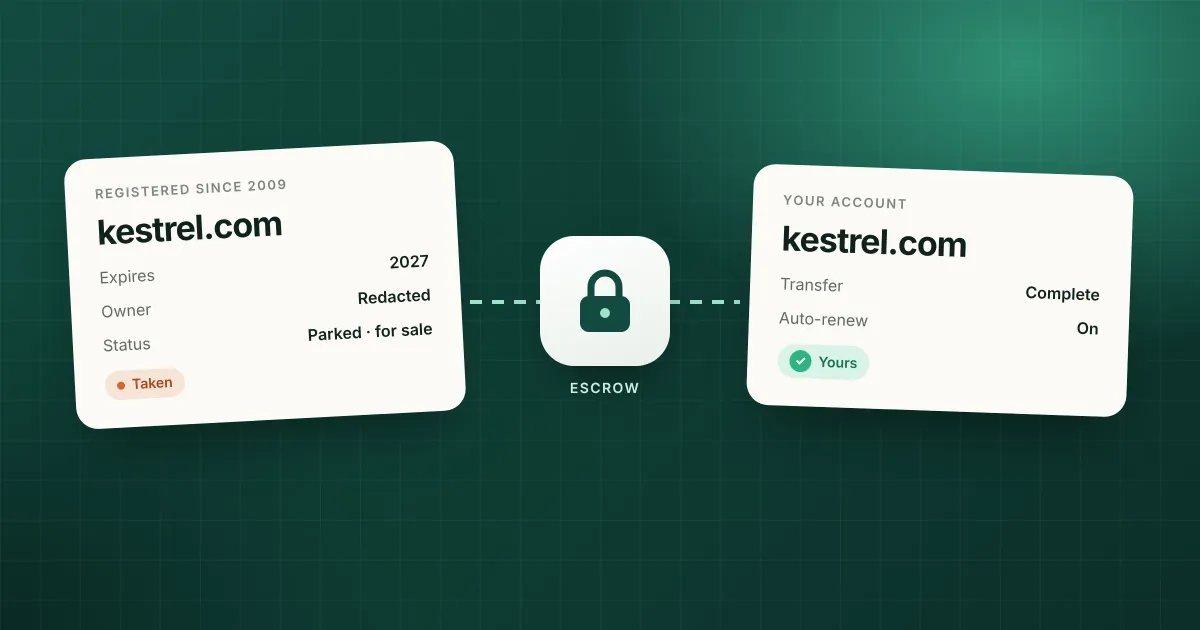
You’ve found the name. It’s short, it’s clear, and someone registered it years ago. The good news is that a taken domain isn’t always a dead end. Plenty of registered names are for sale, and plenty more would be for the right offer. The bad news is that buying one takes some patience, and it’s easy to overpay or get scammed if you skip a step.
The short answer: check whether the domain is listed for sale, find out who it’s registered with, contact the owner directly or through a broker, agree a price, and pay through escrow so the money only moves once the domain is in your account. If the owner won’t sell, watch the domain in case it ever expires.
Here’s each step in more detail.
1. Check whether it’s actually for sale
Start by typing the domain into your browser. What you see tells you a lot.
- A “this domain may be for sale” page means the owner wants offers. These parked pages usually come from a marketplace like Afternic, Sedo or Atom, and many show a price or a “make an offer” form.
- An ad-filled parking page means the owner earns a little from the traffic and may sell, but hasn’t asked for offers.
- An empty page or an error means the domain is registered but not in use. The owner may have forgotten about it, which can work in your favour.
- A real business or project means it’s very unlikely to be for sale at a price you’d want to pay. It’s usually better to move on.
It’s also worth searching the big marketplaces directly. A name can be listed for sale without the domain itself showing it.
2. Find out who owns it
Every domain has a registration record, which you can read with a domain owner lookup or a WHOIS search. It shows the registrar (the company the owner pays), when the domain was registered, when it expires, and its status.
What it usually doesn’t show is the owner’s name. Since GDPR came into force in 2018, most registrars redact the owner’s name, email and address from public records. Companies often still publish their organisation name, but individuals almost never do.
The record still helps:
- The registrar is who to contact if there’s no other way to reach the owner. Many registrars offer an anonymous contact form or a relay email address on their WHOIS page.
- The registration date tells you how long the owner has held it. A name kept for 15 years is held on purpose. A name registered last year might be a speculator’s.
- The expiry date and status tell you whether it’s anywhere near lapsing. If it’s already in its grace or redemption period, waiting may be cheaper than buying. Our expiry and drop-date checker shows the stage and an estimated drop date.
3. Contact the owner
If the site has contact details, use them. Otherwise use the registrar’s contact form. Keep your first message short and low key:
Hi, I came across example.com and wondered if you’d consider selling it. I’m working on a small project and it would be a good fit. Is it available, and if so, do you have a price in mind?
A few things that help:
- Don’t oversell your plans. “A funded startup” or “a big brand” tells the owner they can ask for more.
- Let them name a price first if you can. If you have to go first, start below what you’d actually pay and leave room to move.
- Use an email address that doesn’t reveal a company, if you’re buying for one.
- Expect silence. Many owners never reply. Try once more after a week or two, then move on or try a broker.
4. Or use a broker
A broker contacts the owner for you, without revealing who you are, and negotiates the price. That’s useful when you’re a company the owner might recognise, when the owner is hard to reach, or when you’d rather not haggle.
Brokers charge for this. GoDaddy’s domain broker service, for example, charges an upfront fee of £77.99 per domain in the UK plus 20% commission on the sale price. The fee isn’t refunded if the owner refuses to sell. Independent brokers usually take a percentage of the sale, and the good ones will tell you honestly if they think your budget is unrealistic.
5. Agree a fair price
There’s no official price list for registered domains. What a name is worth comes down to a few things:
- Length and clarity. Short, easy to say and spell names cost more.
- Extension. A
.comusually costs several times what the same name costs in another extension. - Commercial value. Names that match a product category or a common search are worth more to businesses.
- The owner. A domain investor prices it as stock and knows the market. An individual who registered it for a project may just want their costs back.
- Your alternatives. If a good variation is available for the normal registration price, that’s your walk-away point.
Before you negotiate, decide the most you’d pay, and look at what the alternatives would cost you. A few hundred dollars for a clearly better name can be good value. Ten thousand for a name only slightly better than an available one usually isn’t.
6. Pay through escrow
Never send money directly to someone you’ve met over email, and don’t let them transfer the domain “after you pay”. Use an escrow service. The buyer pays escrow, the seller transfers the domain, and escrow releases the money once the buyer confirms the domain is in their account.
Escrow.com is the most widely used for domains. On 3 November 2026 its domain fees were:
| Domain price | Escrow fee | Minimum fee |
|---|---|---|
| Up to $5,000 | 2.6% | $50 |
| $5,000 to $50,000 | 2.4% | $130 |
| $50,000 to $200,000 | 1.9% | $1,200 |
Buyer and seller can agree who pays it, or split it. Marketplaces like Afternic and Sedo have their own payment and transfer process built in, which works the same way.
7. Transfer the domain
Once payment is in escrow, the seller does one of two things:
- A push or account change, if you both use the same registrar. The seller moves the domain into your account. This is quick.
- A transfer, if you use different registrars. The seller unlocks the domain and gives you its transfer code (also called an auth code or EPP code), and you start a transfer at your registrar. This usually takes up to five days and typically adds a year to the registration.
Check the domain shows in your account with you as the owner before you approve the release of funds. Then update its nameservers and contact details, and turn on auto-renew so you don’t lose the name you just paid for.
Your options at a glance
| Option | Cost on top of the price | Speed | Best for |
|---|---|---|---|
| Buy now on a marketplace | Usually none for the buyer | Days | Names listed with a price |
| Contact the owner yourself | Escrow fee | Weeks | Most purchases under a few thousand dollars |
| Use a broker | Upfront fee and/or commission | Weeks to months | Valuable names, companies buying |
| Wait for it to expire | Registration, or a backorder fee | Months, if ever | Names already past their expiry date |
When to wait instead
If the owner won’t sell, or wants far more than you’d pay, you can wait and see if the domain lapses. Most domains are renewed, so don’t count on it, but some do expire, especially ones registered on a whim.
Waiting works best when you know what to look for. A domain that’s merely expired is often renewed during the grace period. A domain that has entered redemption is a much stronger signal, and one in pending delete is days away from being released. Read how domain expiration works for the full timeline.
DomainIdea’s watchlist is built for this. Add the domain and the Mac app checks its registration status for you, shows its stage and estimated drop date, and notifies you when it changes. It checks more often as the drop gets close, so you’ll hear about it in time to place a backorder.
FAQ
Can I find out who owns a domain?
Usually you can see the registrar and the dates, but not the owner’s name, because most registrars redact personal details. Contact the owner through the website itself, the registrar’s contact form, or a broker.
How much does it cost to buy a taken domain?
Anything from a little over the registration fee to many thousands of dollars. It depends on the name, the extension and the owner. Add the escrow fee, around 2.6% with a $50 minimum at Escrow.com for names under $5,000, and any broker fees.
Is it safe to buy a domain from a stranger?
Yes, if you use escrow or a marketplace’s own checkout. Don’t pay by bank transfer or PayPal before the domain is in your account.
Can I take a domain from someone who isn’t using it?
Not just because it’s unused. The only way to take a domain without the owner’s agreement is a dispute under ICANN’s UDRP, which needs a trademark and evidence the domain was registered and used in bad faith.
What if the domain is about to expire?
Check its stage. If it’s in redemption or pending delete, a backorder may get it for far less than buying it. If it’s only just expired, the owner may still renew, and making an offer now could prompt them to.
Sources
Checked on 3 November 2026.
- Domain and website escrow (Escrow.com, fee table)
- Domain broker service (GoDaddy UK, £77.99 plus 20% commission)
- Expired Registration Recovery Policy (ICANN)
- How to buy a taken domain (WPBeginner)